

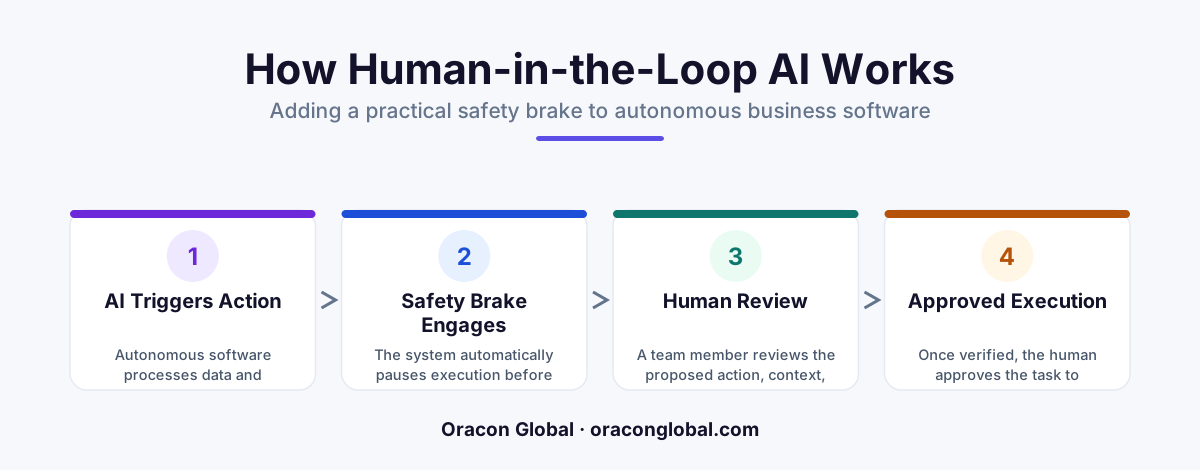
Human-in-the-loop AI is a simple setup where software does the heavy lifting, but pauses to get approval from a real person before making big moves. It acts like a safety brake, letting your team run automation with total peace of mind. By keeping a human in control of payments, contracts, and customer messages, you get speed without the risk of costly mistakes.
Imagine teaching a teenager how to drive a car. You would not hand them the keys, close your eyes, and hope for the best on the highway. You sit in the passenger seat with a foot near the pedal. They steer, but you are there to step in if they get too close to the curb.
That is exactly how human-in-the-loop AI works for your business software. It is a practical design pattern where artificial intelligence handles the heavy lifting of reading files, sorting data, and writing drafts, but stops to get human approval for AI decisions before making costly moves.
If you are a founder or manager looking into modern software, you have likely heard about software tools that work on autopilot. But letting a computer act without a supervisor can lead to messy mistakes. Adding a simple safety brake keeps your business safe while still saving your team hundreds of hours.
What Is Human-in-the-Loop AI in Simple Terms?
To understand the human in the loop meaning, let us break down the basic words:
- AI (Artificial Intelligence): Smart computer programs that can read text, recognize images, and summarize complex information in seconds.
- Autonomous Software: Programs that can take actions by themselves, like sending emails or updating records, without a person pressing a button every time.
- Human-in-the-Loop: A rule built directly into the software that forces the program to pause and ask a real person for a quick check before doing something permanent.
In short, the AI acts as a fast, tireless assistant. It does 95 percent of the work in the background. When it reaches a critical decision—like sending money or contacting a client—it hands the final step over to a person. You get the speed of automation with the safety of human common sense.
A Relatable Example: The Grocery List Analogy
Think about ordering your weekly groceries online. Imagine a smart app that looks at your fridge, notices you are out of milk, and builds a full shopping cart for you automatically. That saves you 20 minutes of browsing.
Without a safety brake, the app might guess wrong, order ten cartons of almond milk instead of one, and charge your credit card immediately.
With a human in the loop, the app builds the cart and sends a quick text message to your phone: "We picked 12 items for your weekly run. Tap here to approve the order before we pay." You glance at your phone, fix the milk count in two seconds, and tap confirm. The heavy work was done for you, but you kept total control over your wallet.
Real-World Business Use Case: Paying Vendor Invoices
To see how this protects a business, consider how a finance team manages vendor bills. Every month, a company might receive hundreds of PDF invoices from different suppliers. Processing these by hand takes days of boring typing.
How the Process Works Step-by-Step
- Reading the Document: An automated software tool opens incoming emails, reads the PDF bill, and copies the vendor name, invoice date, and total dollar amount.
- Checking the Rules: The program matches the bill against your internal bank records to ensure the prices match what was agreed upon.
- The Pause (The Safety Brake): If the bill is under five hundred dollars, the system marks it as safe. But if the bill is for ten thousand dollars, the software pauses. It creates a ready-to-pay draft and flags it for your finance manager.
- The Quick Check: Your manager gets a neat dashboard alert showing the original PDF on the left and the prepared payment on the right. They verify the charge with one click.
- Final Action: Once approved, the software sends the payment. If the manager hits cancel, the money stays safe in your account.
Because of this setup, the finance manager never spends hours typing numbers into software. They simply spend two minutes reviewing high-value payments. That is business AI safety in practice.
Why Does Autonomous Software Need a Safety Brake?
Computers are exceptionally good at processing data fast, but they do not possess real-world intuition. They cannot pick up on subtle context, legal risks, or personal customer relationships.
Here are three simple reasons why keeping a human in the loop protects your organization:
1. It Prevents Embarrassing Client Communication Errors
An automated sales or support tool might write a great reply to an unhappy customer, but it might accidentally promise a full refund when company policy does not allow it. Having a team member review the message draft takes three seconds and prevents broken promises.
2. It Protects Your Bank Account and ERP Data
If an automated tool misreads a decimal point on a document, it might turn a $100.00 entry into a $10,000 entry inside your main business databases. A quick human check acts as a permanent firewall against bad data entries.
3. It Builds Trust Across Your Team
Employees are often hesitant to adopt new tools if they fear the computer will make wild mistakes that they have to clean up later. Knowing that software has built-in safety stops makes teams eager to use modern tools to reduce their daily workload.
How Software Teams Build Safe Approval Systems
Creating safe tools does not require complicated, clunky screens. At Oracon Global, our senior team builds modern web apps, custom mobile tools, and automated workflows that make this review step effortless for busy teams.
Instead of logging into heavy, complex systems, your managers get simple action queues. The software presents the work in a clean interface where approving a task feels as easy as checking off a to-do list on your phone.
Best of all, when you build custom software, you retain full ownership of your product and code. You get to decide exactly where the safety brakes live based on your unique business rules.
Final Thoughts: Speed Without the Stress
You do not have to choose between fast automation and business safety. By adopting human-guided automation, you get the best of both worlds. The computer acts as your engine, doing the manual labor, while your team stays in the driver's seat with ultimate control.
If you want to automate your repetitive business workflows without taking unnecessary risks, we are here to help. Explore our live interactive software demos on our website to see how intelligent tools handle complex work safely, or reach out to the team at Oracon Global today to discuss your next custom web or mobile application.
Frequently asked questions
What does human-in-the-loop AI mean in simple terms?
It means smart software does the hard work, but stops to ask a real person for approval before taking an important or risky action.
Why can't we just let AI run completely on its own?
AI is great at reading and organizing data, but it lacks human judgment. Without a safety brake, an automated tool might send the wrong email or pay a bad invoice.
What happens when the AI asks for approval?
The software prepares the action as a draft and sends a quick alert to a team member, who can click to approve, edit, or cancel it in seconds.
Will human-in-the-loop AI slow down my team?
No, it actually speeds work up. Your team stops doing manual data entry and spends just a few seconds reviewing finished work before it goes out.
Read next
Beyond Chatbots: How to Build AI Agents That Actually Do Work for Your Business
Most businesses use AI to answer questions. Here is how to build custom AI agents that actually take action, connect to your internal tools, and handle complex workflows.
Beyond the Wrapper: How to Build Custom AI Agents for Business That Actually Work
Many businesses invest in basic AI wrappers only to find they lack the security and context needed for real work. Here is how to build custom AI agents that integrate deeply with your workflows and databases.
Enterprise AI Maintenance Costs: Budgeting for Year Two and Beyond
Building an AI system is only half the battle. Discover the practical, ongoing operational costs of enterprise AI, including token management, model drift, and continuous security audits.
Oracon Global builds production-grade AI agents, automation and apps — and you own the code and IP. Tell us what you want to automate.
Book a call →See our work